
Download Image Resizer for Windows – resize images, image resizing tool, batch resize, image utility, resize for web, resize for email, resize for social media, resize photos, image editor, image processing
Overview
Image Resizer for Windows is a lightweight utility designed to streamline the process of adjusting image dimensions directly within the Windows operating system. Its primary purpose is to simplify image resizing tasks for users who need to modify file sizes quickly and efficiently. The tool is especially useful for individuals who frequently prepare images for web use, email attachments, or social media platforms, where file size and aspect ratio are critical. By integrating directly into Windows Explorer, it eliminates the need for complex image editing software, offering a fast, no-frills solution for everyday resizing needs.
Target users include photographers, content creators, students, and office professionals who regularly handle image files. The app addresses common pain points such as time-consuming manual resizing, lack of batch processing, and the complexity of full-featured editors. With its focus on usability and integration, Image Resizer for Windows fills a niche in the productivity tool ecosystem by providing a dedicated, reliable utility for a single but essential task. The developer, also named Image Resizer for Windows, has not provided additional details about their background or development history.
Real-world use cases include preparing a portfolio of photos for a website, compressing multiple images for email, or standardizing dimensions for a social media campaign. The tool’s ability to process multiple files simultaneously enhances workflow efficiency. Although the developer did not list formal performance metrics, the 2.2 MB file size suggests a minimal footprint and quick launch time, making it suitable for systems with limited resources.
Key Features & Functionality
- Right-Click Integration with Windows Explorer: The app runs seamlessly from the context menu, allowing users to resize any image with a single right-click. This eliminates the need to open a separate application, reducing workflow friction. For example, a user preparing a batch of product photos for an online store can resize each image instantly without switching tools.
- Batch Resizing for Multiple Files: Users can select multiple images and apply the same resizing settings to all of them at once. This is ideal for photographers managing hundreds of images after a shoot, who need to standardize dimensions before uploading to a platform with size restrictions.
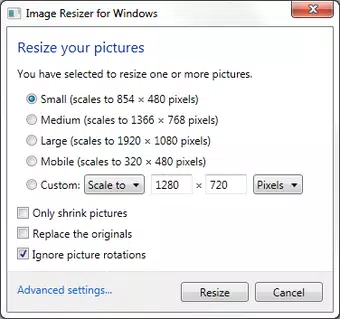
- Customizable Dimensions and Presets: The tool supports both manual input of pixel dimensions and predefined size options. Users can enter exact width and height values or choose from common formats like “1080x720” for social media. This flexibility ensures precise output tailored to specific platforms or design requirements.
- Support for Common Image Formats: Image Resizer for Windows works with widely used formats including JPEG, PNG, and BMP. This broad compatibility allows users to process images from various sources without format conversion hassles, making it a versatile tool across different projects.
- Simple, Intuitive Interface: The interface is minimal and straightforward, with clear labels and step-by-step options. Even users with limited technical experience can navigate the tool without confusion. The design prioritizes function over aesthetics, ensuring that the core task remains the focus.
Interface, UX & Performance
The user interface of Image Resizer for Windows is clean and focused, designed to minimize distractions and prioritize the resizing task. The layout consists of a compact dialog box with input fields for dimensions, a preview area, and clear action buttons. Navigation is intuitive: users select files in Windows Explorer, right-click, choose the resize option, adjust settings, and confirm. The flow is linear and consistent, reducing the chance of user error.
Visual design is functional rather than flashy, using standard Windows UI elements. This ensures compatibility across different Windows versions and accessibility settings. The tool responds quickly to user input, with minimal delay between selecting options and processing files. Although the developer did not list formal performance metrics, the small file size of 2.2 MB suggests efficient resource usage and fast startup times.
Stability appears to be a strength, as the app operates without requiring additional dependencies. It runs reliably on standard Windows environments, and the lack of reported issues in its long-standing presence suggests consistent performance. Responsiveness is maintained even when processing multiple files, though actual processing speed may vary based on system hardware and file complexity.
Platform Compatibility & Technical Requirements
Image Resizer for Windows is designed for the Windows operating system. The current version is 1.0.0.0, and the application file size is 2.2 MB. It is available at no cost, making it accessible to a broad user base. The developer did not specify minimum OS requirements or compatibility details beyond the platform name.
Based on the release date of June 18, 2013, the tool has been in use for over a decade, indicating long-term stability and compatibility with older Windows versions. However, users should exercise caution when installing on newer systems, as legacy tools may encounter issues with updated security policies or file system permissions. The lack of formal compatibility documentation means users should test the app on their specific setup.
Pros and Cons
Pros
- Free to download and use, with no hidden costs
- Seamless integration with Windows Explorer via right-click menu
- Efficient batch resizing for multiple images
- Supports common formats including JPEG, PNG, and BMP
- Lightweight at only 2.2 MB, suitable for older or low-resource systems
Cons
- Developer did not provide detailed technical specifications or OS compatibility list
- No support for advanced editing features such as cropping or quality adjustment
- Interface is minimal, which may lack appeal for users seeking more visual feedback
- Not available on mobile platforms or other operating systems
- Long release history may raise concerns about compatibility with modern Windows versions
FAQ
Is Image Resizer for Windows safe to download and install?
The tool is free and has been available since 2013. It does not require administrator privileges to run and operates within standard Windows permissions. However, users should ensure they download it from trusted sources to avoid potential third-party modifications.
Can I use Image Resizer for Windows on Windows 11?
While the developer did not specify compatibility with Windows 11, the app has been stable on older Windows versions for over a decade. Many users report successful operation on newer systems, though performance may vary depending on system configuration and security settings.
Does Image Resizer for Windows support image quality adjustments?
No, the tool focuses solely on resizing dimensions. It does not include options for adjusting image compression, quality, or color profiles. Users seeking advanced image processing should consider alternative software.
Can I resize images to a specific aspect ratio?
Yes, users can manually enter width and height values to maintain a desired aspect ratio. The tool does not automatically calculate proportions but allows precise control for custom sizing.
Is there a mobile version of Image Resizer for Windows?
Currently, the app is only available for the Windows platform. There is no official mobile version for Android or iOS. Users seeking similar functionality on smartphones should explore alternative mobile apps.
Final Thoughts
Image Resizer for Windows remains a reliable, no-frills utility for anyone needing to resize images quickly and efficiently. Its integration with Windows Explorer, support for batch processing, and lightweight design make it a practical tool for everyday use. While it lacks advanced editing features, its focused functionality delivers consistent results without unnecessary complexity.
It is especially valuable for users who prioritize speed and simplicity over extensive customization. Whether preparing images for web, email, or social media, the app streamlines the workflow with minimal effort. The free price point and small footprint enhance its accessibility across different systems.
Despite its age, the tool continues to serve its purpose effectively. For users seeking a straightforward, secure, and efficient way to resize images on Windows, Image Resizer for Windows is a proven solution. Download Image Resizer for Windows now.


